Scriptorium
Algebra with letters: simplify, factor and solve in your document
Type =FACTOR(x⁴ − 1) and the cell shows (x − 1)(x + 1)(x² + 1), set as maths. Seven functions work with letters, in a table cell or in the middle of a sentence, and every answer is checked before it is shown.
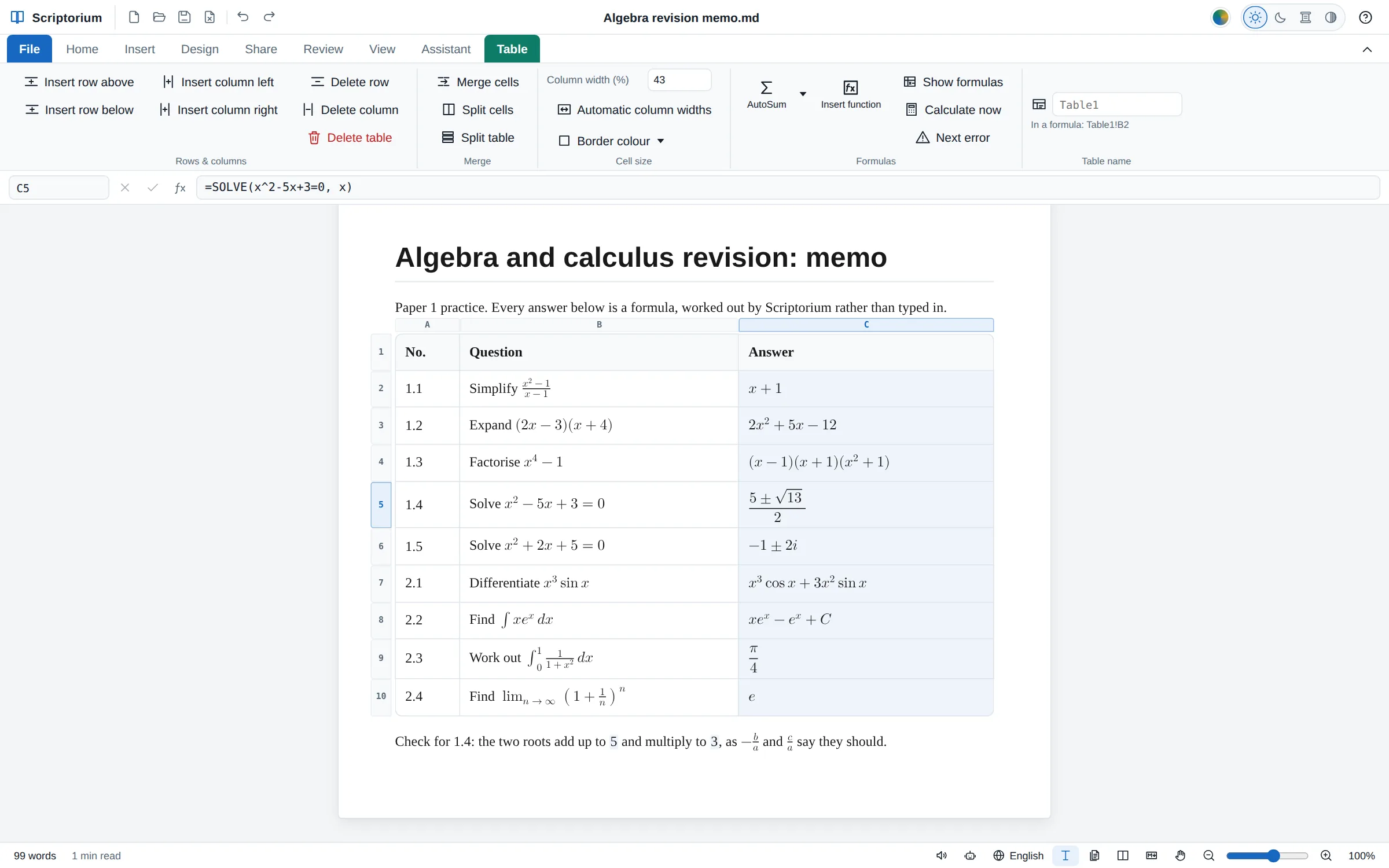
A spreadsheet only works with numbers. Type a letter that has no value into Excel and you get an error, and the nearest it comes to solving x² − 5x + 3 = 0 is a decimal from Goal Seek. Since Scriptorium 3.46, letters can stay letters. Ask it to factor x⁴ − 1 and it answers (x − 1)(x + 1)(x² + 1). Ask it to solve that equation and it answers (5 ± √13)/2. The answer is set as maths, with real fraction bars and root signs, in a table cell or in the middle of a sentence.
Seven functions that work with letters
Type them as you type any formula: in a table cell after =, or in your writing between {= and }. The answers below are the ones Scriptorium gives.
| You write | The answer |
|---|---|
=SIMPLIFY((x²−1)/(x−1)) | x + 1 |
=EXPAND((a+b)³) | a³ + 3a²b + 3ab² + b³ |
=FACTOR(x⁴−1) | (x − 1)(x + 1)(x² + 1) |
=SOLVE(x² − 5x + 3 = 0, x) | (5 ± √13)/2 |
=DIFF(x³ sin x, x) | x³ cos x + 3x² sin x |
=INTEGRATE(x eˣ, x) | xeˣ − eˣ + C |
=INTEGRATE(1/(1+x²), x, 0, 1) | π/4 |
=LIMIT((1 + 1/n)ⁿ, n, ∞) | e |
- SIMPLIFY cancels fractions, adds up like terms and tidies roots:
=SIMPLIFY(√12)is 2√3. - EXPAND multiplies out the brackets:
=EXPAND((2x − 3)(x + 4))is 2x² + 5x − 12. - FACTOR splits a formula into factors, with whole numbers and fractions, in one letter or several:
=FACTOR(x²y − y³)is y(x − y)(x + y). A whole number is split into its primes:=FACTOR(360)is 2³ × 3² × 5. - SOLVE gives exact answers, with roots and ± where they do not come out, and complex ones when there are no others:
=SOLVE(x² + 2x + 5 = 0, x)is −1 ± 2i. Letters can stand for numbers:=SOLVE(ax + b = 0, x)is −b/a. Two equations in two letters are solved together:=SOLVE({x + y = 5; x − y = 1}, {x; y})gives x = 3 and y = 2. - DIFF is the derivative, and a third number asks for the second or the third:
=DIFF(ln x, x, 2)is −1/x². - INTEGRATE is the integral, with + C, as a textbook writes it. Give it two values more and it is the exact area between them:
=INTEGRATE(x², x, 0, 3)is 9. - LIMIT finds a limit exactly where it can, at a number or at ∞.
You don’t have to remember them: Insert function on the Table tab has them in a group of their own, Algebra with letters, with a box for each thing a function needs.
How letters are read
Inside these functions, a letter that has no value is a letter. Letters written side by side are multiplied, as in maths: 2πr is 2 × π × r, and ab + ba simplifies to 2ab. π is pi, e is 2.718…, and i is the square root of −1. Greek letters work too: =DIFF(sin θ, θ) is cos θ. A letter followed by a number, such as B2, is still a cell.
where gives a letter a number: =DIFF(x³, x) where x = 2 is 12. The functions go inside each other, so =SIMPLIFY(EXPAND((x + 1)²) − x²) is 2x + 1.
As in Excel, a minus in front is worked out before a power: =-2^2 is 4, so -x^2 means (−x)², which is x². Write minus x squared as -(x^2), or with the small raised ², −x², which is read the way maths reads it.
An answer you can use
An answer with no letters left in it is a number to every other formula. (5 ± √13)/2 is shown exactly, and =ROUND(SOLVE(x² − 5x + 3 = 0, x), 2) gives 0.7 and 4.3. An answer with letters can have numbers added to it, =EXPAND((x + 1)²) + 1 is x² + 2x + 2, and a cell that holds one can be used by the next: =DIFF(B2, x) differentiates whatever B2 says.
Double-click an answer to see the formula behind it, or to change it. The Markdown file keeps the formula, never the answer, so the working is still there next year.
Checked before it is shown
Every integral is differentiated back and compared with what you asked for. Every root is put back into its equation, and every limit is compared with numbers close to the point. An answer that fails is not shown: the function works it out with numbers instead, as SOLVE and LIMIT did before, or says it cannot.
Some things have no answer made of letters. The integral of e−x² is the best known: =INTEGRATE(e^(-(x^2)), x) says there isn’t one, while between two numbers, =INTEGRATE(e^(-(x^2)), x, 0, 1), it is still worked out: 0.7468 to four places. Equations of the third degree and higher that don’t factor are solved with numbers, as before. A formula whose answer would run to thousands of terms stops with a tip, so the page never freezes while you type.
On paper, in PDFs and in Word
The answers are typeset on the page, in the Pages view, in the print preview, in PDFs and in web pages. Word, OpenDocument and RTF files and plain text have them written on one line, (5 ± √13)/2, which those programs keep as text you can edit. Read aloud says them as a person would: “the fraction 5 plus or minus the square root of 13 over 2”.
For a teacher that means a memo whose answers are worked out rather than typed: change a number in a formula and its answer follows, set as maths. Our guide to an exam paper and its memo shows how to keep the two together, and the guide to Excel formulas in a Markdown document covers the rest of the formulas.