Scriptorium
Markdown tables without borders, or with only the lines you want
An order form wants lines between its rows, a signature block wants none. Since Scriptorium 3.47 a table can leave out any of its lines, from the Lines menu on the Table tab, and the Markdown file keeps them left out.
Not every table is meant to look like a grid. An order form wants lines between its rows and none up and down. A signature block wants no lines at all, just a line to sign on. A page of notes laid out in two columns wants nothing that looks like a table. Since Scriptorium 3.47 a table can leave out any of its lines: all of them, the ones round the outside, the ones inside, or a single line of a single cell.
The Lines menu
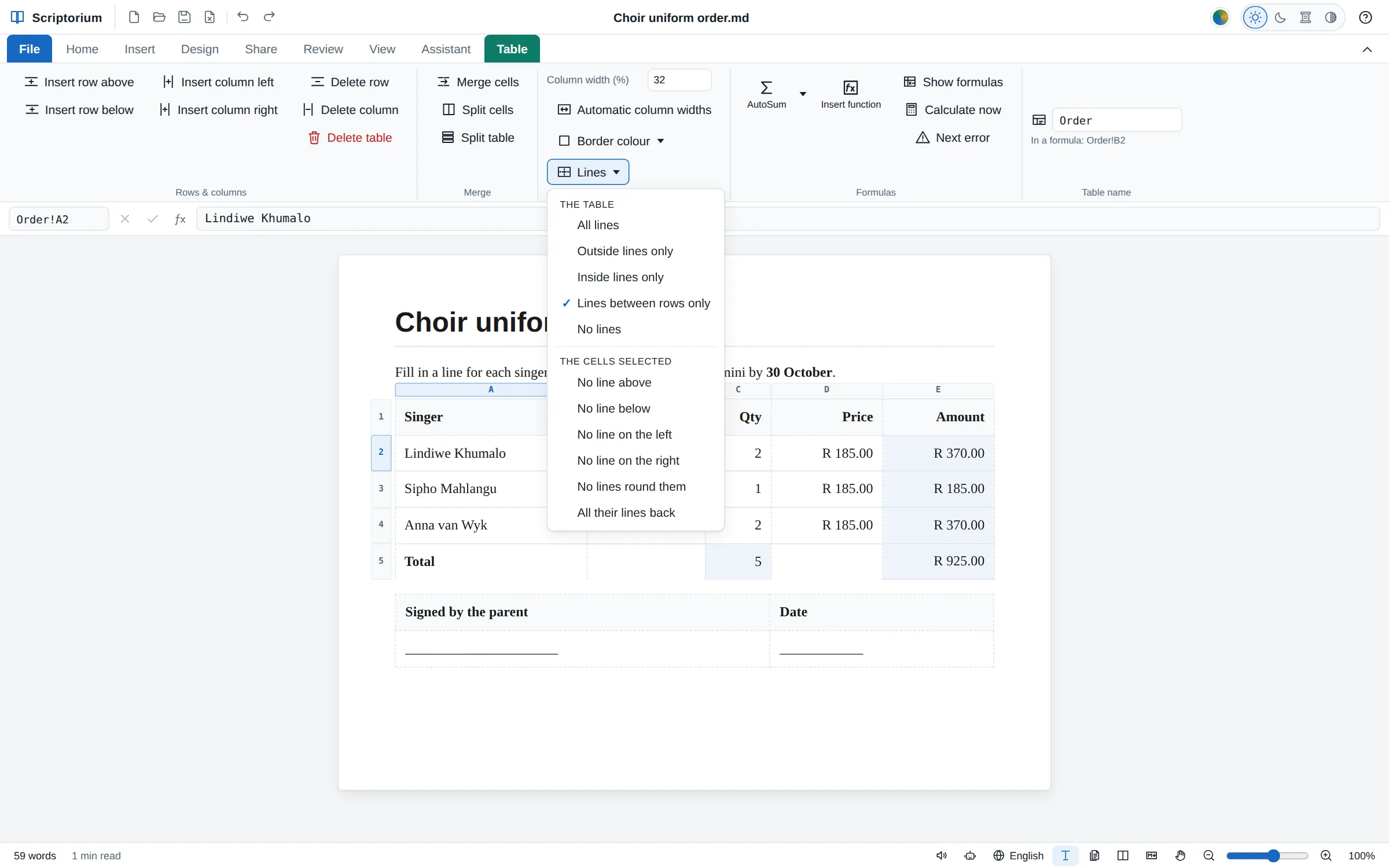
Click in a table, open the Table tab and press Lines. The top half of the menu is for the whole table:
- All lines: every line, as tables have always had.
- Outside lines only: a box round the table and nothing between the cells.
- Inside lines only: the lines between the cells, without the box round them, like a noughts-and-crosses grid.
- Lines between rows only: lines across and none up and down, the way most printed forms and price lists look.
- No lines: none at all, for laying words out in columns.
The bottom half is for the cells you select. Drag across them with the mouse, or simply put the cursor in one, and choose No line above, No line below, No line on the left, No line on the right or No lines round them. All their lines back gives them all four again. A tick shows what is chosen, and undo puts everything back.
Faint while you type, gone on paper
A line left out is gone, whatever the cell on its other side has: when a cell leaves out the line under it, the cell below can’t draw it back. While you write, Scriptorium shows each line that is left out as a faint dashed line, so you can still see where the cells are and click into an empty one, the way Word shows gridlines. In Reading view and in the print preview the dashes disappear, and nothing is printed.
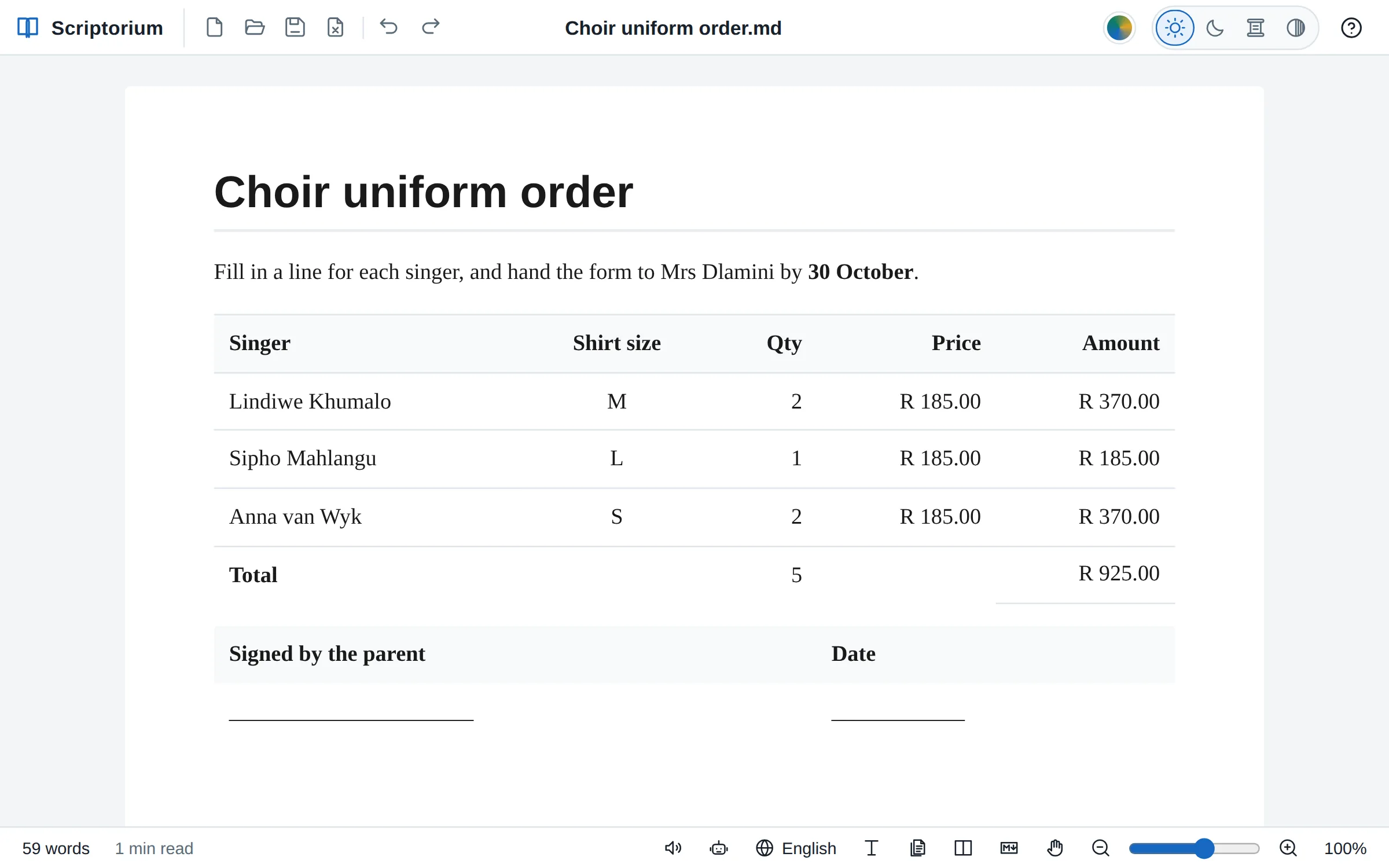
An order form, step by step
- Insert a table with five columns (Insert ▸ Table) and type the headings: Singer, Shirt size, Qty, Price and Amount. The amounts and the totals can be formulas, such as
=C2*D2and=SUM(E2:E4). - Choose Table ▸ Lines ▸ Lines between rows only.
- In the Total row, select the cells from Total to the Price column and choose No line below. Only the amount keeps its line, the way a total is underlined in a set of accounts.
- Under the table, put a table of two columns for the signature and the date, type a row of underscores to sign on, and choose No lines.
In the Markdown
The lines are kept in the Markdown file as two small commands, which other programs show as plain text. On the line above a table, {table:lines=rows}, or outside, inside or none in place of rows. At the start of a cell, {cell:hide=bottom}, or top, left, right or all, or several at once, such as {cell:hide=top,left}. A short order form looks like this in its Markdown:
{table:lines=rows}
| Singer | Qty | Amount |
|---|---:|---:|
| Lindiwe Khumalo | 2 | R 370.00 |
| Sipho Mahlangu | 1 | R 185.00 |
| {cell:hide=bottom} **Total** | {cell:hide=bottom} =SUM(B2:B3) | =SUM(C2:C3) |
You never have to type these: the menu writes them. With the Markdown in colour, they are coloured as commands, so they are easy to spot in the Markdown view.
In Word, PDFs and web pages
PDFs, web pages and e-books leave the lines out as the page does. So do Word, OpenDocument and RTF files. Word draws a line between two cells when either cell has it, so Scriptorium takes such a line away from both cells, and the file looks the way your page does.
It works the other way too. A Word table with no inside lines, only inside lines, only lines between the rows, or no lines at all opens in Scriptorium as one, and so does a Word cell with some of its own lines taken away. Tables with rounded or chamfered corners, from File ▸ Appearance, leave lines out in the same way.
A table without lines is still a table: it can add itself up, as our guide to Excel formulas in a Markdown document shows, and the invoice and quotation templates are a good place to try it.