Scriptorium
Hear your writing: read aloud for proofreading, and a cast of voices for stories
Your ear catches what your eye skips. Scriptorium reads documents aloud, highlights each sentence as it goes, and can give every character in a story a voice of their own.
After you have read a page five times, you stop seeing it. Your eyes fill in the missing word, skip the repeated one, and glide over the sentence that runs out of breath halfway. Hearing the page read aloud breaks the spell, which is why editors have long told writers to read their work out loud. Scriptorium will do the reading for you.
Start reading
Put the cursor where you want to begin, and press Read aloud on the Review tab, or the speaker at the bottom of the window. Scriptorium reads on from the paragraph you are in. Select some text first, and it reads just that.
The sentence being read is highlighted as it goes, so you can follow along and stop the moment something sounds wrong. A small bar shows that it is reading, with buttons to pause and to stop, and Esc stops it too.
Voice settings, the cog at the end of the Read aloud group on the Review tab, chooses the voice, the speed (from half speed to two and a half times as fast) and the pitch, and can turn the highlighting off. For proofreading, a little slower than normal works best: you hear each word rather than the gist.
The reading is made for listening. Simple formulas are read in words, and footnote markers and blocks of code are skipped, so the flow isn’t broken by symbols.
Better voices
Every computer comes with a voice or two. They work, but they can sound flat over a long chapter. Voices, on the Review tab, fetches better ones: free, natural-sounding voices in more than thirty languages.
- The first time, Scriptorium fetches a small speech program, about 20 MB.
- After that, each voice is a download of between 25 and 110 MB.
- Nothing is downloaded until you press a button, and a voice that is on your computer works without the internet.
Downloading voices needs the installed desktop version. On Windows you can also add Microsoft’s own voices, under Settings ▸ Time & language ▸ Speech ▸ Manage voices ▸ Add voices, and every voice you add there appears in Scriptorium.
Read it like a play
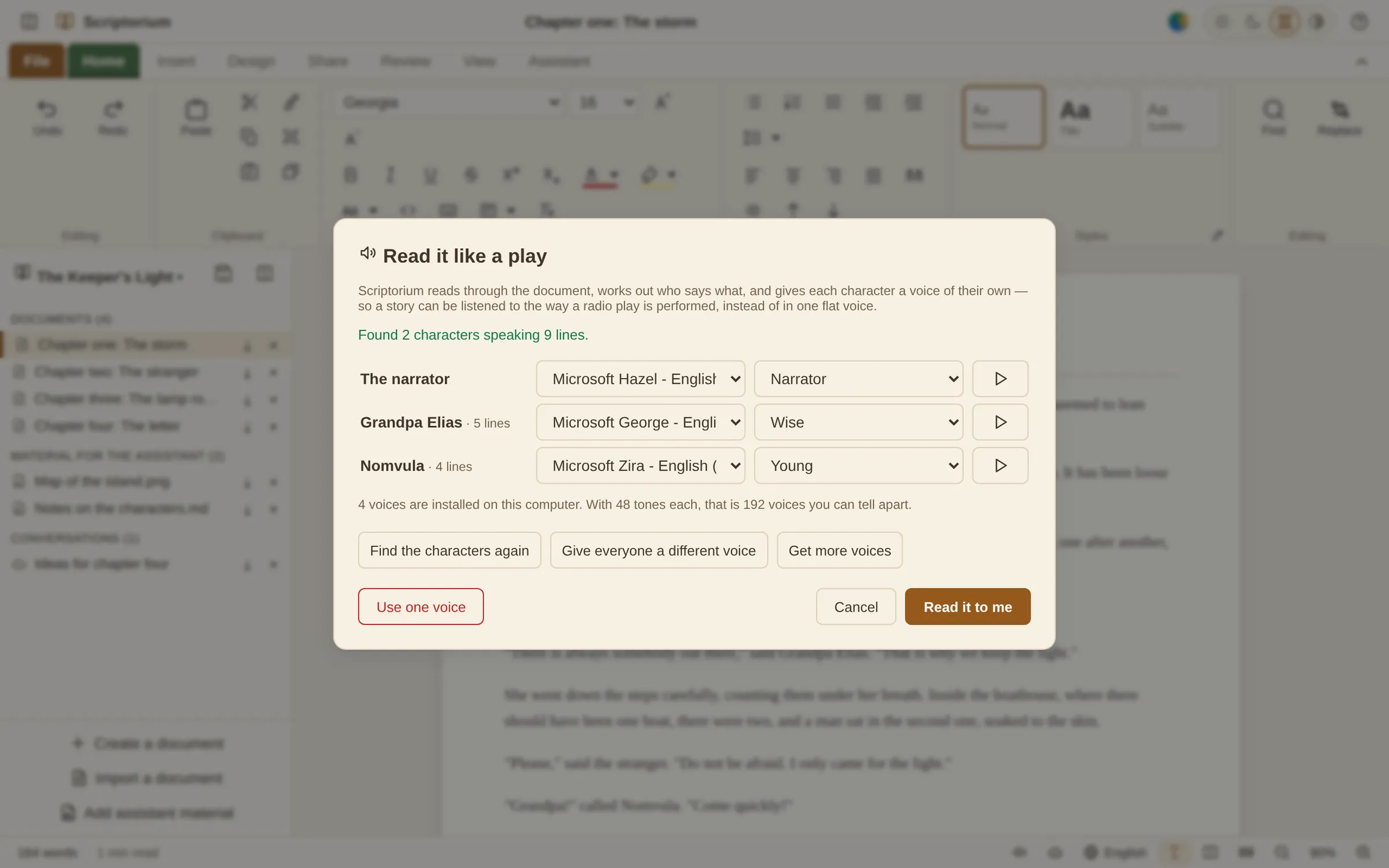
For fiction, one voice for everything gets confusing: who is talking now? Cast, on the Review tab, opens Read it like a play. Scriptorium reads the chapter, finds the characters who speak, and lists each one with the number of lines they have, along with the narrator.
It finds speech in quotation marks (“Come inside,” said Barnaby) and lines written as a play script (Barnaby: Come inside.), in English.
- Give everyone a different voice shares out the voices so that no two characters sound alike.
- Or choose a voice and a tone for each character yourself, and press ▶ to hear how they will sound.
- Find the characters again after you have written more.
- Read it to me starts the performance, and Use one voice goes back to plain reading.
The tones are what make a handful of voices go a long way. There are 48 of them in seven groups (Plain, Warm, Alluring, Dark, Odd, Young and old, and Feeling), from Gentle, Wise and Cheerful to Whispering, Sinister, Gruff, Robotic and Sleepy. Each tone changes how a voice sounds, so the few voices on an ordinary computer become dozens that you can tell apart. The panel does the sum for you: the voices on your computer, times 48 tones.
A sound underneath
In Voice settings, Background sound plays something quiet underneath the reading, from the first word to the last: rain, a thunderstorm, wind, ocean waves, a stream, a fireside, a forest, birdsong, the night, a cave, a café, a city, a train, a ship, a ticking clock or a heartbeat. How loud sets it against the voice. The sounds are made by Scriptorium while they play rather than recorded, so they add nothing to the download and need no internet.
A storm under a ghost story, a café under a chapter set in one: it is a small thing that makes a story read aloud feel like a place.
Who it helps
- Writers hear a chapter the way a listener will, and catch the line of dialogue that no one would say.
- Teachers check that a test or a worksheet reads clearly, or read a passage to a class.
- Anyone learning a language hears a text while following the words on the page.
- Anyone who finds long reading tiring can sit back and listen instead.