Scriptorium
Make a song sheet with chords that play
Type the words with the chords in square brackets and Scriptorium lays out a proper song sheet, with chord boxes, and plays the chords back so you can hear the changes.
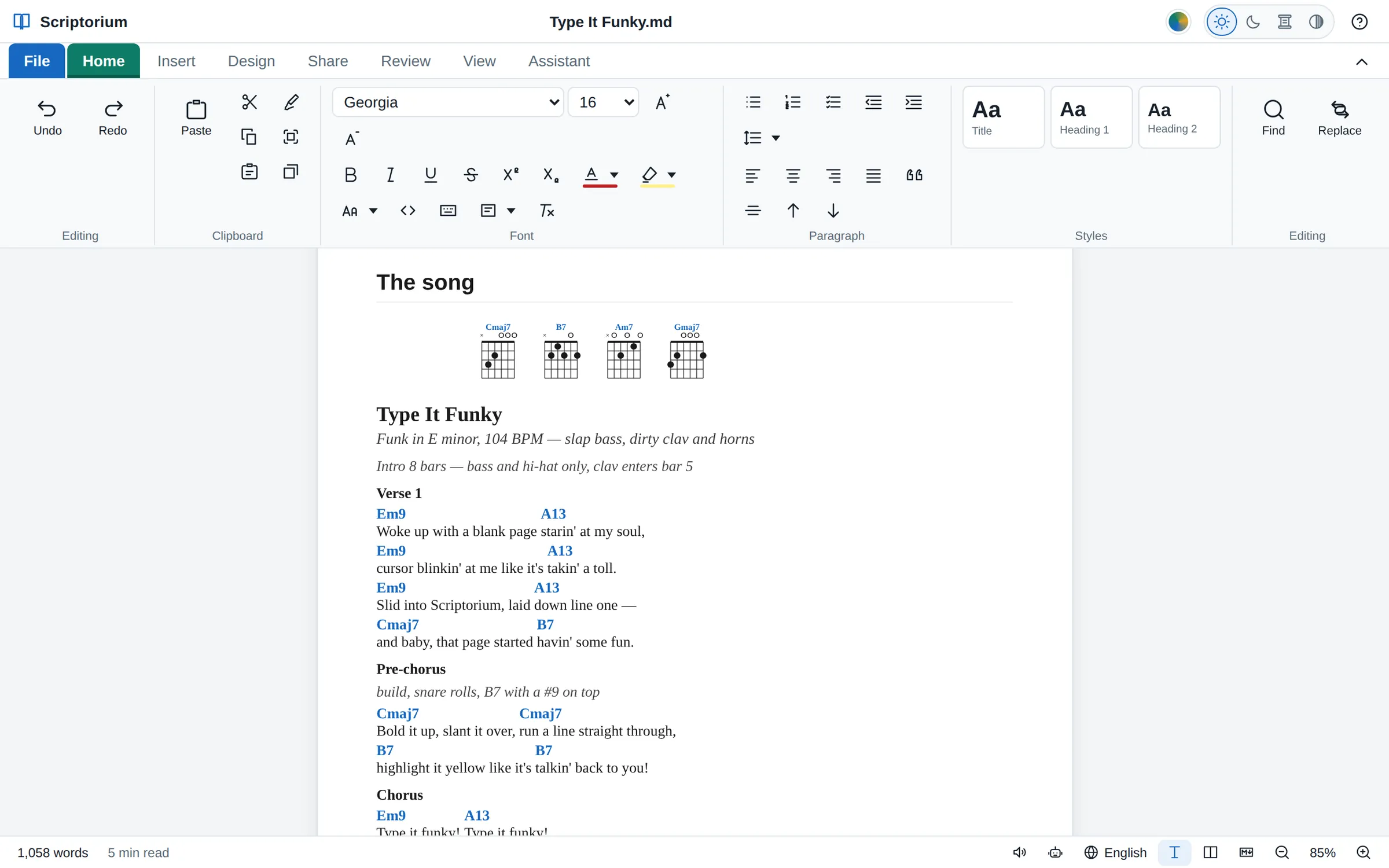
Worship teams, school choirs, buskers and songwriters all need the same page: the words, with the chords above them in the right places, easy to read on a music stand. In an ordinary word processor, getting a chord to sit over the right syllable is a fight with the space bar, and it is lost the moment the font changes. Scriptorium lines the chords up for you, and can play them back.
Insert a song
- Go to Insert ▸ Music.
- At the top of the Music window are two choices, each drawn as a tiny sample of itself. Chords over the words is chosen to start with, and the box holds an example to change.
- Type the song, watch it drawn under How it will look, and press Insert.
Write each chord in square brackets, just in front of the syllable where it changes:
{title: Amazing Grace}
{sov: Verse 1}
A[G]mazing [G7]grace, how [C]sweet the [G]sound
That [G]saved a wretch like [D]me
{eov}
That way of writing songs is called ChordPro, and many chord apps and songbooks use it, so songs you already have in ChordPro can go straight in. A few lines in curly brackets organise the sheet:
| Type | What it does |
|---|---|
{title: …} | the song’s title |
{subtitle: …} | a line under the title, for the key, the writer or the tempo |
{sov: Verse 1} … {eov} | a verse, with its name |
{soc} … {eoc} | the chorus |
{sob: Bridge} … {eob} | a bridge |
{comment: …} | a note to the band, such as “Capo 2” or “Slow down here” |
{diagrams: off} | no chord boxes |
To change the song later, switch to Side by side or Markdown code on the View tab and edit its lines there. The sheet is drawn again a moment after you stop typing.
Chord boxes
At the top of the sheet, Scriptorium draws a guitar chord box for each chord in the song, so a guitarist can see the fingering at a glance. It knows 43 shapes: the everyday major and minor chords, sevenths, major and minor sevenths, suspended chords and a few more, such as Cadd9, G/B and D/F#. A chord it doesn’t know is still written above the words, just without a box. If you would rather have no boxes at all, add {diagrams: off}.
Hear the changes
Under the song is a small play bar. Press ▶ and Scriptorium plays the chords in order, a gentle strum on each, while the chord being played lights up on the sheet. The list beside it, shown as small pictures, has ten instruments to play them on: piano, guitar (the one a song sheet starts with), strings, flute, saxophone, organ, brass, horn, bell and drums.
A chord sheet has no rhythm written in it, so every chord gets the same steady length, a little over a second. It is there to give you the changes and the sound of the song while you learn it, not to stand in for the band.
- 💾 saves what it plays as a .wav sound file, made on your own computer.
- 🔴 records your voice from the microphone, with the chords playing underneath, and puts the take into the document as a clip, right after the song. It is a quick way to keep a melody before you forget it.
Staff notation, too
For a tune written out note by note, choose the stave in the Music window. Staves are written in ABC, a well-established way of writing music as plain text: a few header lines for the title, the metre, the note length, the tempo and the key, then the notes as letters. Chord names go in quotation marks above the notes, and the words on a w: line underneath.
X: 1
T: Ode to Joy
M: 4/4
L: 1/4
Q: 1/4=100
K: D
"D"F F G A | "A"A G F E | "D"D D E F | "A"F3/2 E/ E2 |
w: Joy-ful, joy-ful, we a-dore thee, God of glo-ry, Lord of love;
Scriptorium draws the stave and plays the tune, with an accompaniment made from the chord names. When there are words, a 🎤 button sings them to the notes, in one of Scriptorium’s own singing voices (Clear, Warm, Bright or Deep) or a voice you have downloaded for reading aloud. It makes a very good guide vocal for learning a part, though it is not a trained singer.
Print it
Song sheets and staves print, and go into PDFs and e-books, the way they look on the page; the play bar never prints. In a Word file a stave becomes a picture, and a chord sheet goes in as its ChordPro text, so for the band, send a PDF.
For a whole songbook, make a project with File ▸ Project ▸ New empty project and give each song a document of its own. Read the whole thing then puts every song together, ready to print. (Projects are part of the desktop version, for Windows and Linux.)
Try the sample
“Type It Funky”, the Scriptorium song, has a song map for the band, the chords over the words and a tune in ABC. Download it and open it in Scriptorium to see how it is written, and to hear it.