Scriptorium
A word processor in isiZulu, Afrikaans, Sesotho and 57 more languages
Scriptorium speaks 60 languages, including all eleven written official languages of South Africa. Here is what that covers, how to switch, and where spelling and translation fit in.
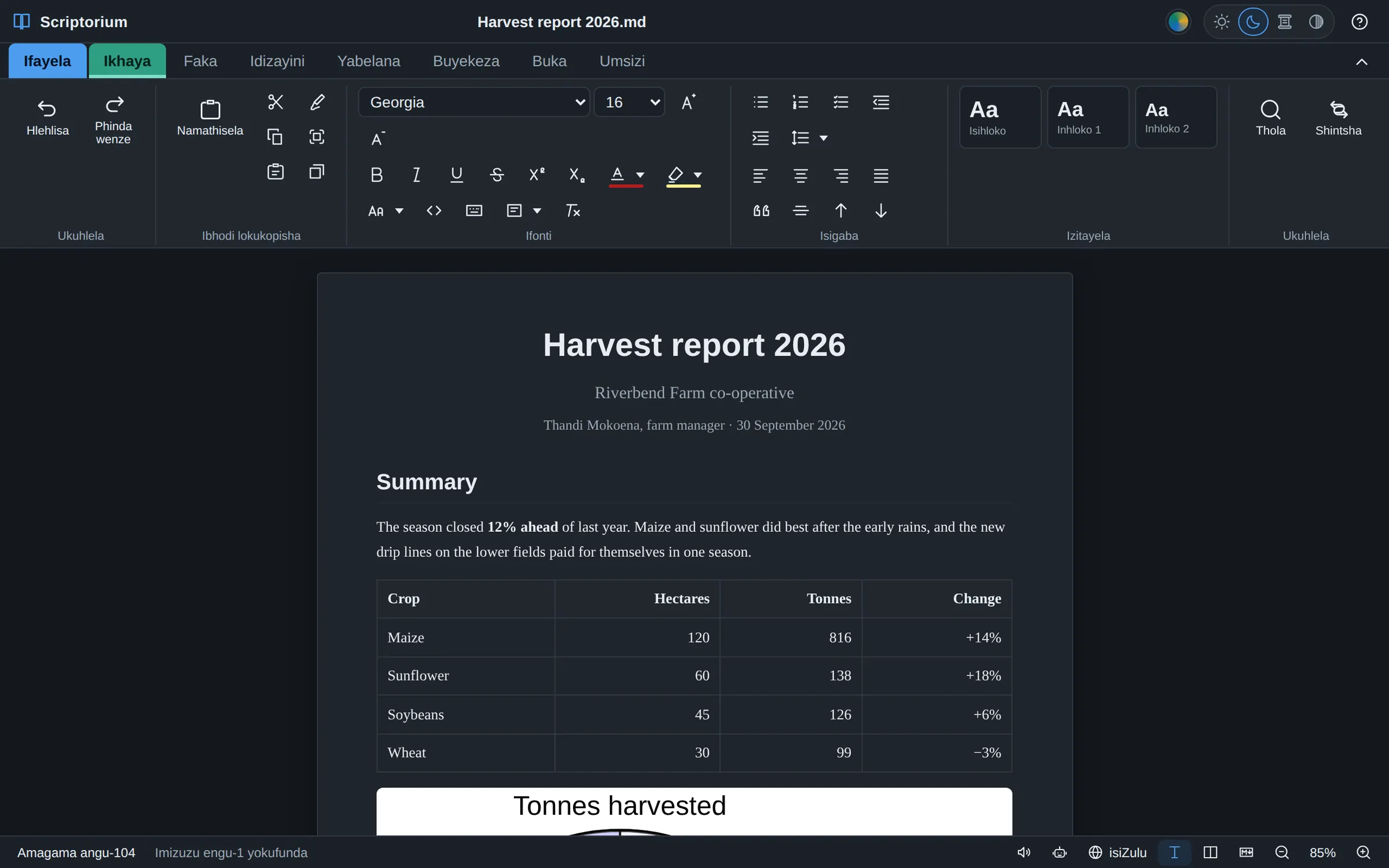
Most software reaches South Africa in English, and now and then in Afrikaans. Scriptorium is made in Gqeberha, and it speaks every one of the country’s eleven written official languages: Afrikaans, English, isiNdebele, isiXhosa, isiZulu, Sepedi, Sesotho, Setswana, siSwati, Tshivenḓa and Xitsonga. (The twelfth official language, South African Sign Language, is not a written one.)
Alongside them are 49 more, from Amharic, Hausa, Igbo, Kiswahili, Somali and Yorùbá to Arabic, Hindi, Chinese, Japanese and most of the languages of Europe. The full list is at the end of this guide.
What “speaks” means
Almost every word Scriptorium shows you is translated: the ribbon and its tooltips, the File pages, every window and message, the right-click menu and the menu bar. That is over 1,200 pieces of text in each language. The 40 help topics inside the program are translated too, and so are the templates: start a letter or a report with Scriptorium in isiXhosa, and its headings and sample text are in isiXhosa.
Five of the languages are written from right to left: Arabic, Hebrew, Pashto, Persian and Urdu. Choose one, and the whole window turns round, with the ribbon, the panes and the page all running from the right.
How to switch
- Click the globe at the bottom of the window, which opens the settings at Interface language. It is also on the Review tab.
- Pick the language.
The change happens at once, with nothing to restart. The first time Scriptorium starts, it uses your computer’s language if it has it.
Spelling is a separate choice
The language Scriptorium speaks to you and the language you write in are not always the same. A teacher may want the menus in isiZulu and an English essay checked in English, or the other way round. So spelling has its own setting: on the Review tab, the Check spelling box under Interface language chooses the dictionary, and the Check spelling button beside Find and Replace turns the red underlining on and off.
Scriptorium doesn’t bring dictionaries of its own: it uses the spelling dictionaries of the system it runs on. On Windows and Linux the list puts first the languages your computer has a dictionary for, and the rest follow under “No dictionary on this computer”. You can still choose one of those, because the language you choose here is also your document’s language: when you haven’t picked a voice, Read aloud chooses one that speaks it, and the Country list below belongs to it.
Your country’s words
English is not one language. A South African who writes “braai”, “bakkie” or “takkies” is not making mistakes, but a British or American dictionary underlines every one of them. Under Country, also on the Review tab, choose South Africa, and Scriptorium accepts 120 words that South Africans use every day, from “lekker”, “howzit” and “eish” to “geyser”, “matric” and “yebo”, with British spelling for everything else. It says so as it does it: “Now writing as in South Africa — 120 local words accepted”.
There are 41 countries and regions, with 1,514 local words between them: Nigeria, Kenya, Ghana and Zimbabwe among the Englishes, Suid-Afrika and Namibië for Afrikaans, Kenya and Tanzania for Kiswahili, and more for Portuguese, Spanish, French, German, Dutch and Arabic. The Country list shows the ones for the language you check spelling in. Whichever AI service the assistant uses, it is told the country too, so it writes the way people there write, and uses the local word where a local would.
Translate a whole document
Translate, on the Review tab, turns a document into any of the 60 languages as a new document, so the original stays exactly as it was. The translating is done by the AI assistant, so it needs the assistant set up first (here is how).
Machine translation has come a long way, but it is still a draft. For anything that matters, ask someone who knows the language well to read it before it goes out, especially in a language with less written material for the AI to have learnt from.
Reading aloud
Read aloud uses the voices on your computer, and Scriptorium can download free, natural-sounding voices in more than thirty languages that work without the internet. The languages with voices depend on what each computer has and what is available to download, so look in Review ▸ Voices for yours. More about reading aloud.
All 60 languages
The eleven written official languages of South Africa are marked.
- Afrikaans
- አማርኛ Amharic
- العربية Arabic
- বাংলা Bengali
- မြန်မာ Burmese
- 简体中文 Chinese (Simplified)
- 繁體中文 Chinese (Traditional)
- Čeština Czech
- Nederlands Dutch
- English
- Français French
- Deutsch German
- Ελληνικά Greek
- ગુજરાતી Gujarati
- Hausa
- עברית Hebrew
- हिन्दी Hindi
- Magyar Hungarian
- Igbo
- Bahasa Indonesia Indonesian
- Italiano Italian
- 日本語 Japanese
- Basa Jawa Javanese
- ಕನ್ನಡ Kannada
- ខ្មែរ Khmer
- 한국어 Korean
- Bahasa Melayu Malay
- മലയാളം Malayalam
- मराठी Marathi
- नेपाली Nepali
- Sepedi Northern Sotho
- پښتو Pashto
- فارسی Persian
- Polski Polish
- Português Portuguese
- ਪੰਜਾਬੀ Punjabi
- Română Romanian
- Русский Russian
- Sesotho
- සිංහල Sinhala
- siSwati
- Soomaali Somali
- isiNdebele Southern Ndebele
- Español Spanish
- Kiswahili Swahili
- Svenska Swedish
- தமிழ் Tamil
- తెలుగు Telugu
- ไทย Thai
- Tshivenḓa
- Setswana Tswana
- Türkçe Turkish
- Українська Ukrainian
- اردو Urdu
- Oʻzbekcha Uzbek
- Tiếng Việt Vietnamese
- isiXhosa Xhosa
- Xitsonga
- Yorùbá
- isiZulu Zulu